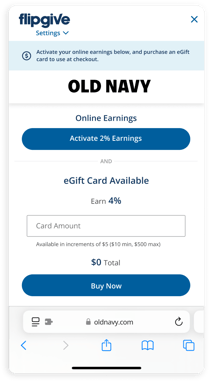


Almost done! Follow these steps to allow permissions
We need these settings so we can find earnings for you while you shop.
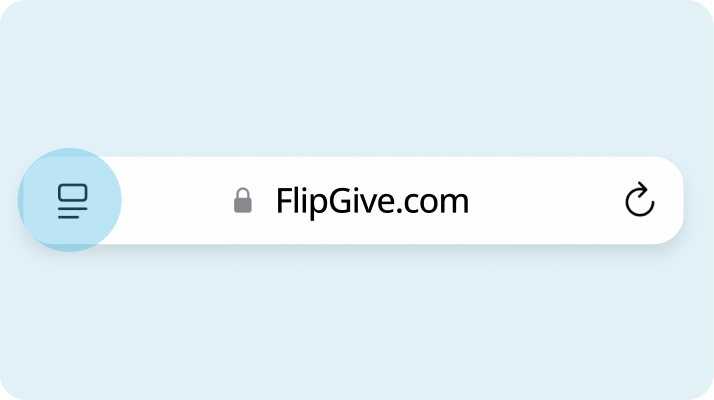
1. Tap the Page Settings icon
.png?width=714&height=400&name=Group%201000001055%20(1).png)
2. Tap on FlipGive logo
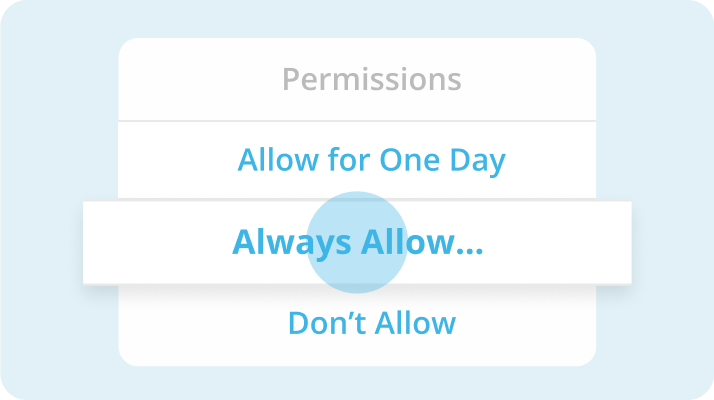
3. Select “Always Allow” then “Always Allow on Every Website”
These permissions let us automatically tell you when earnings are available. Be sure to “Always Allow” so you never miss out!
You're ready to shop and earn!
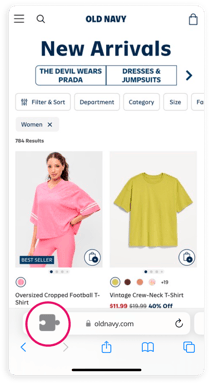
As you shop your favorite brands' websites in Safari, the extension will appear whenever earnings are available—whether from activating online earnings, buying eGift cards, or both! If the extension doesn't appear for a site, tap the puzzle piece icon in the search bar and select FlipGive to expand the extension and review available earnings.
.png?width=210&height=384&name=Frame%201618873051%20(2).png)